Wednesday, 6 January 2016

Week twelve

Week 12: (07/12/15)


At this stage, this is when I start writing the script for the animation. As in what the characters are going to say, are there any sound effects or images etc

Firstly, I researched ways of writing a script, this is important as it has to be professional. I then decided to search on you tube some sound effects which will be included in the animation:


Sound effects
  When changing screens:  https://www.youtube.com/watch?v=xHtDBG8owYc
   Pouring liquid in glass: https://www.youtube.com/watch?v=A7SuoetOEQk

As I have already mentioned the script needs to be professional, therefore I started off with the title:


St. Anne’s Catholic High School for Girls
THE SCIENCE LAB
Rules in a Science Lab

WRITTEN BY

©Nadia Conteduca


 And I then included the cast, voice-overs and scenes which will be in the animation, in this way I am presenting who will be in the animation and what to expect:


CAST
Maryann: St. Anne’s Student
Maria: St. Anne’s Student
Floriane: St. Anne’s Student
Mr. Smith: Teacher at St. Anne’s


VOICE-OVERS

Maryann: Interpreted by Marta
Maria: Interpreted by Sarah
Floriane: Interpreted by Dishti
Mr. Smith: Interpreted by Vittorio

SCENES

Scene 1- Welcome Screen
Scene 2- Menu Screen
Scene 3- Rule 1 (Safety goggles)
Scene 4- Rule 2 (Bunsen burner)
Scene 5- Rule 3 (Conical flask)
Scene 6- Rule 4 (No food and drink)
Scene 7- Rule 5 (Tie hair back)
Scene 8- Video Screen
Scene 9- Quiz Screen

I then start writing the Synopsis, and this is an introduction to the whole animation.


This is a script for the pre-preparation of my animation regarding the rules of a science lab. I will be showing the risks and hazards which could happen if students are not careful and do not pay attention. I will illustrate this by using images of the science equipment’s such as a Bunsen Buner, a conical flask and more. The animation is for students in KS3/KS4. This animation is for students in year 7 to 9, this will help them understand more the science lab as they are new to this environment, especially the year 7's, who will have to learn new rules, understand the purpose of the equipment’s and how to carry out a practical; how the practical should be set up and what kind of things you should do and should not do all for health and safety reasons which is definitely crucial. The characters will be explaining and will be guiding the students throughout the animation. There are four characters who will be involved in this animation; they are Maria, Floriane, Maryann and Mr. Smith. In turns they will be introducing each different screens; firstly, we have the welcome screen this is where the characters will be presenting themselves and summarise the animation and its aim. We then have the Menu screen, and this is where the contents page will take place, this will allow students to navigate throughout the animation and look at different screens depending on where they click on, the contents page includes links to ‘home screen’, ‘the five rules’ the ‘video screen’ and the ‘quiz screen’ . In each screen there will be a voice explaining what the screen is about, this will be done by my personnel who are the voice-overs, so I will then record their voices. In the animation, I need to make sure that the characters seem as realistic as possible, in this case I have to make sure that the characters blink throughout the animation and open their mouths whilst speaking, in this way it seems that they are realistically talking in the animation and that there is no voice-over.


Monday, 4 January 2016

Week eleven

Week 11: (30/11/15)

This is the stage of the navigation. I will be creating the navigation using flash. In an animation students should be able to easily navigate and find pages and it's also a way to guide the students in the animation, therefore it is important to add buttons in order to look at the pages they would prefer. In order to make the animation stand-out to the audience, I decided to make the buttons move using Motion Tween.


Week Ten

Week 10: (23/11/15)
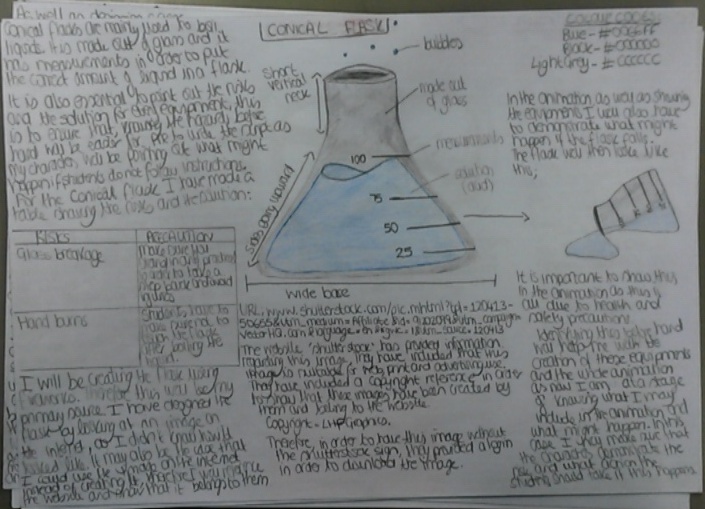
At this stage I also started designing the equipments. As you can see this is a conical flask. I have included the risks and how to take precaution as the conical flask is one of my rules. I have noted down that this will be a primary source as I will be creating this myself using fireworks. I have also spoken about the copyright; I looked at several images on the internet and I then came across an image which I found easy to draw. Eventhough I will be creating this myself, it is important to write down the URL of the image as I have copied the exact same photo.


Week Nine

Week 9: (16/11/15)


Rule 1 -Safety goggles
Rule 2- Bunsen burner
Rule 3- Conical flask
Rule 4 -No food and drink
Rule 5 -Tie hair back

These are the rules I've chosen for this animation, I tried to include different ones so that it would not be repetitive. For every rule I have pointed out ways to take precaution and how students can avoid injuries.


RISKS- Chemicals in your eye
PRECAUTION- Wear safety goggles


 Firstly we have the rule of the safety goggles which is very straight forward, so students should wear safety goggles during practicals.

RISKS- Accidentally touch the Bunsen burner
PRECAUTION- Make sure to turn to the yellow (safety) flame 

Secondly, we have the Bunsen burner. This equipment is based on the hazard of fire. Again, this is another danger which is very important to point out.


RISKS- Flasks breaking 
PRECAUTION- Step back and never touch glass

 Thirdly, we have the conical flask. This is a glass hazard. What can happen whilst using this equipment is the hazard of glass breakage, which would likely injure someone if they are not careful. 

RISKS- Food likely to get contaminated 
PRECAUTION- Never eat in a science lab

Fourthly, we have the 'No food and drink' sign. This is important because many students to eat in the laboratory, therefore for their own safety it is important to point out that in a lab we use chemicals and different equipment, so food can easily get contaminated. 

RISKS- Hair can easily catch fire
PRECAUTION- Make sure to always tie your hair 

 Last of all, to tie your hair back. This rule is mostly related to girls, and the animation will be presented to an only girls' school, therefore it is important to point this out as the majority have long hair. Tying hair back is important especially when you're using a Bunsen burner and there's fire.

Sunday, 3 January 2016

Week Eight

Week 8: (9/11/15)

At this stage we started designing our storyboard for the animation, at first we created the characters and these characters will be presenting the animation, and  they will be talking to the audience. There are four different characters in total, there's Maryann, Floriane, Mr. Smith and Maria. 

As you can see, as well as designing the characters and knowing how they look like, we also had to add many annotations. I have spoken about how these characters will be created, in this case using the software Adobe Fireworks. I will be creating the St.Anne's uniform in order to represent the school. The clothes and the characters in general need to have colour. Therefore, on Adobe Fireworks I have looked at the codes for each colour, for example; white: #FFFFFF. This will allow me to have a visual presentation of the characters before-hand and it's also time-consuming. 

I have also spoken about the copyright. The copyright in this case is only the logo, as I will not be creating, this is because the logo needs to be original. Therefore, this will be a primary source. 

I made sure that all my characters had different hair-styles and colour skin in order to have equal ethnic-rights and match different cultures.